Picture this: It's tournament morning. 200 families are lined up for check-in. You're juggling a clipboard, a cash box, and a tablet that keeps freezing. Someone's asking if their ticket transferred. A parent wants to donate on the spot. Your co-organizer is texting you for the donor list. And you're wondering why event management feels like chaos when it should feel like a celebration.
What if you could check in every guest with a tap, see live donation totals as they roll in, and manage your entire fundraiser from your phone—even without Wi-Fi?
Today, we're thrilled to announce the Fund My Squad mobile apps for iOS and Android. Your fundraiser is no longer tied to your laptop. It's in your pocket, ready whenever your community shows up.
Why We Built Mobile Apps for Event Organizers
Fund My Squad has always been about making fundraising and event management effortless. But we heard from coaches, booster club presidents, PTA volunteers, and nonprofit leaders that the busiest moments—game day, tournament check-in, benefit dinners, school carnivals—happen away from desks.
You need real-time control when you're on the field, in the gym, or at the venue. You need to check in 200 guests without a laptop. You need to see who donated during halftime. You need offline mode when the venue Wi-Fi fails.
So we built apps that put full fundraising and event management power in your hands, wherever you are.
What You Can Do With the Fund My Squad Mobile Apps
1. Check In Guests With QR Code Scanning
Every ticket buyer gets a unique QR code (and an Apple Wallet or Google Wallet pass). When they arrive at your event, open the app, tap "Check In," and scan their code. Instant confirmation. No paper lists. No confusion.
The app works offline, so even if your venue has spotty Wi-Fi, you can check in guests and sync data later. Perfect for outdoor tournaments, school gyms, and community centers.
2. Track Donations and Ticket Sales in Real Time
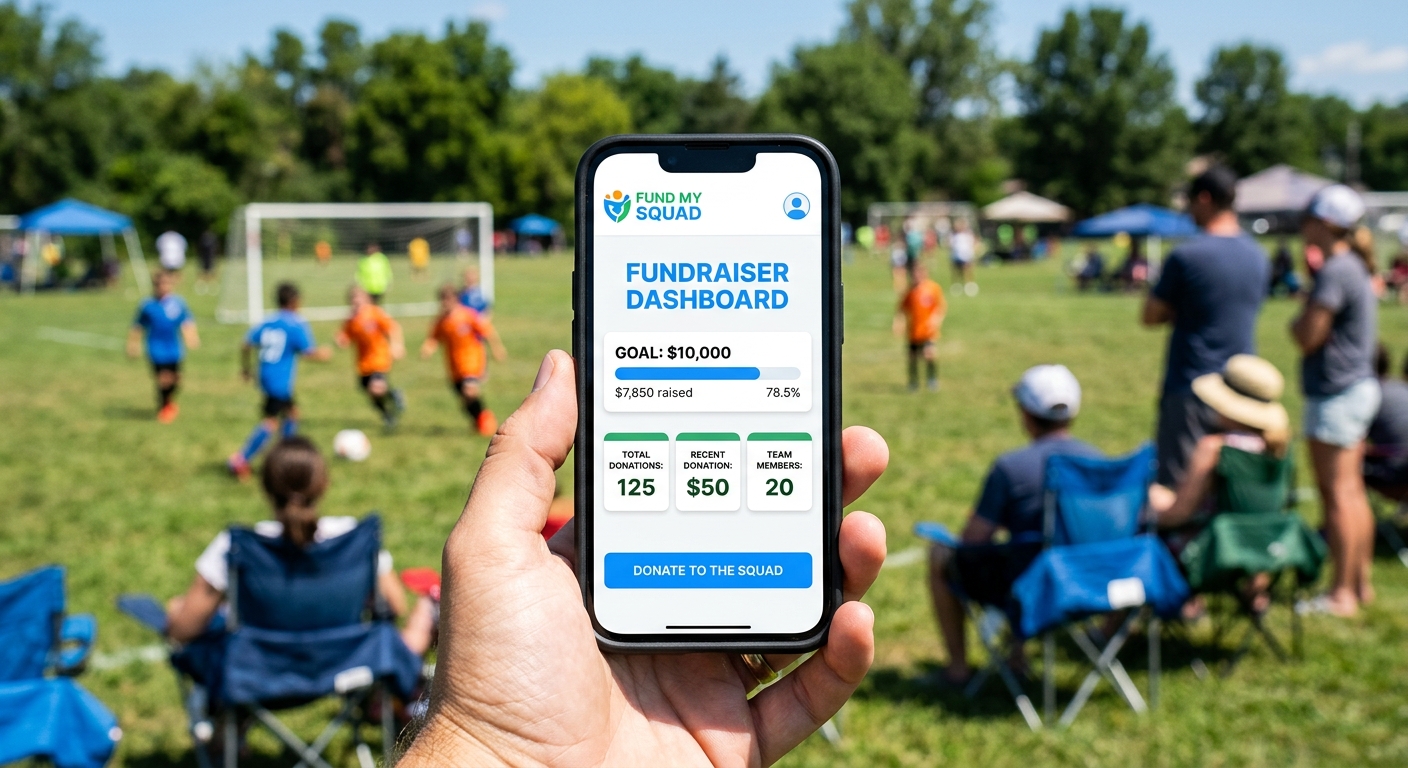
Open your dashboard and see live updates:
Total raised right now
Number of donors and ticket buyers today
Progress toward your goal
Recent donor activity (names, amounts, messages)
Whether you're at a banquet, a tournament, or a fundraiser kickoff, you'll always know where you stand. Share updates with your team. Celebrate milestones as they happen.
3. Manage Multiple Fundraisers and Events
Running a spring tournament and a summer gear fundraiser at the same time? No problem. The app shows all your active campaigns in one place. Switch between them with a tap. Update details, check stats, and respond to questions—all from your phone.
4. Access Attendee and Donor Lists On the Go
Need to see who RSVP'd? Check the attendee list. Want to send a personal thank-you to your top donors? Pull up the donor list and send messages directly from the app.
Everything syncs with the web platform, so your co-organizers see the same real-time data whether they're on desktop or mobile.
5. Share Your Fundraiser Instantly
Spread the word with one tap. The app makes it easy to share your fundraiser link via text, email, Instagram, Facebook, or any messaging app. The more you share, the more your community rallies.
6. Apple Wallet and Google Wallet Integration
Your ticket buyers can add their tickets to Apple Wallet or Google Wallet right from their confirmation email. No need to dig through emails or print PDFs. Their ticket is always one tap away on their lock screen.
At check-in, they show their phone, you scan the QR code, and they're in. Smooth, professional, and fast.
How to Download and Get Started
Step 1: Download the Fund My Squad app from the Apple App Store or Google Play Store.
Step 2: Log in with your Fund My Squad account. (Don't have one yet? Sign up free here and create your first fundraiser or event in 5 minutes.)
Step 3: Tap into your dashboard. See your active fundraisers, check donation totals, and access your attendee lists.
Step 4: At your next event, tap "Check In" and start scanning QR codes. Watch your guest list update in real time.
That's it. You're managing your fundraiser like a pro—from anywhere.
Real-World Use Cases: Event Organizers Love Mobile Access
Youth Sports Tournaments: A travel baseball coach uses the app to check in 150 families at a weekend tournament. Parents show their phones, he scans, they're through the gate in seconds. Between games, he checks the donation dashboard and sees they've raised $1,200 toward their summer travel fund.
School Carnivals: A PTA volunteer manages ticket sales and check-in at the spring carnival. Kids arrive with digital tickets on their parents' phones. She scans them in, tracks who's attended, and shares real-time stats with the PTA board—all from her phone.
Nonprofit Galas: A nonprofit event coordinator checks in 200 guests at a benefit dinner. Attendees show their Apple Wallet passes. She scans them, marks their table assignments, and watches live donation totals climb during the silent auction—all without leaving the welcome desk.
Booster Club Kickoffs: A football booster club president launches the season fundraiser at a kickoff BBQ. He shares the fundraiser link via text to every parent, tracks donations as they come in during the event, and sends thank-you messages before families leave.
Every event becomes easier. Every fundraiser feels more connected. Every organizer has the tools they need—right in their pocket.
Why Fund My Squad Is Different From Other Fundraising Platforms
Most fundraising platforms treat events and donations as separate workflows. You buy tickets on Eventbrite. You donate on GoFundMe. You manage check-in with a spreadsheet. It's fragmented, clunky, and stressful.
Fund My Squad combines it all: ticketing, donations, check-in, and fundraising analytics—in one platform, on one app, with zero platform fees.
FeatureFund My SquadEventbriteGoFundMeZeffyPlatform Fees0% on everything3.7% + $1.79/ticketTips from donors0% (aggressive tip prompts)QR Code Check-In✅ Built-in app❌ Separate tool❌ No events❌ No eventsOffline Mode✅ Yes❌ NoN/AN/ADonations + Tickets✅ Same page❌ Separate platforms❌ No ticketing❌ No ticketingMobile App✅ iOS & Android✅ Organizer app only❌ Web only❌ Web onlyApple/Google Wallet✅ Yes✅ YesN/AN/AReal-Time Dashboards✅ Yes✅ Yes⚠️ Limited⚠️ Basic
When you choose Fund My Squad, you're choosing simplicity, transparency, and tools that actually work the way event organizers work.
Coming Soon: Mobile-Exclusive Features
We're just getting started. Here's what's coming to the mobile apps in the next few months:
Push notifications for new donations, ticket purchases, and event updates
Team messaging to coordinate with co-organizers in real time
Photo uploads from events to share with supporters and build momentum
Offline donation collection for cash/check donations entered on-site and synced later
Check-in analytics showing peak arrival times, no-show rates, and attendance trends
Want early access to beta features? Email us and let us know what you'd love to see in the app.
FAQ
Q: Is the Fund My Squad mobile app free?
Yes! The app is 100% free to download and use. There are no subscription fees, no per-event charges, and no hidden costs. Just like the web platform, Fund My Squad charges 0% platform fees on donations, tickets, and product sales. You keep everything you raise (minus standard payment processing fees from Stripe).
Q: Can I use the app offline?
Yes. The check-in feature works offline, so you can scan QR codes and admit guests even without Wi-Fi or cellular service. Once you reconnect, all check-in data syncs automatically to your dashboard.
Q: Do ticket buyers need to download the app?
No. Ticket buyers receive their QR code tickets via email and can add them to Apple Wallet or Google Wallet with one tap. They don't need to download the Fund My Squad app—just show their phone at check-in and you'll scan their code.
Q: Can I manage multiple fundraisers from the app?
Absolutely. If you're running multiple campaigns or events (like a tournament and a gear fundraiser), you'll see all of them in the app. Switch between fundraisers with a tap and manage everything from one place.
Q: Does the app work for both fundraisers and ticketed events?
Yes! Fund My Squad is built for both. Whether you're selling tickets to a banquet, accepting donations for a team, or doing both at the same time, the app handles it all. Check in guests, track donations, and see real-time stats—no matter what type of campaign you're running.
Q: What if I already have a fundraiser on Fund My Squad? Do I need to start over?
Nope. Just download the app and log in with your existing account. All your active fundraisers, donor lists, and attendee data are already there. You'll pick up right where you left off—now with mobile access.
Download the App and Take Control of Your Next Event
Your community shows up for you. Now it's time for your fundraising tools to show up for you, too.
Whether you're managing a youth sports tournament, a school carnival, a nonprofit gala, or a booster club kickoff, the Fund My Squad mobile apps give you everything you need to check in guests, track donations, and celebrate your success—all from your phone.
Download now:
New to Fund My Squad? Create your free fundraiser or event in 5 minutes, then download the app to manage it on the go.
Your next event is about to get a whole lot easier. Let's go. 🚀
Related reading:
How to Turn Your Spring Tournament Into a Fundraiser (Step-by-Step Guide for Coaches)
15 Creative Fundraising Ideas for Schools, Teams, and Community Groups in 2026
Fund My Squad Partners with Treats Island to Sweeten Your Fundraisers
For event organizers focused on youth sports, explore our Youth Sports Fundraising page. Schools and PTAs, check out School Event Ticketing. Nonprofits, see Nonprofit Fundraising Events.